A customer file with missing contact details is frustrating.
You may have the person’s name and address, but no email. You may know the company, job title, and city, but not the direct phone number. You may have years of customer records sitting in a CRM, but half the fields you need for a real campaign are blank.
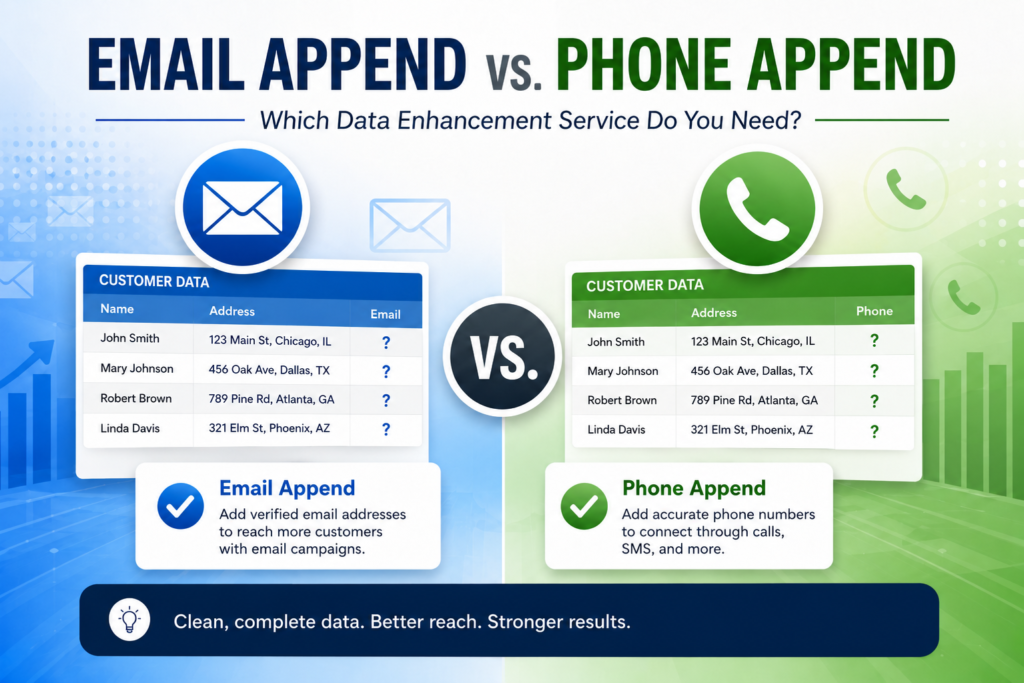
That is where data append services come in. Email append adds missing email addresses to existing records. Phone append adds missing phone numbers. Both can make a list more usable, but they solve different problems.
The mistake many businesses make is choosing the data field first. The smarter way is to choose the campaign first.
If you are planning email follow-up, newsletters, product announcements, or customer reactivation campaigns, email append may be the better fit. If you need sales calls, appointment setting, telemarketing, lead qualification, or SMS planning, phone append may matter more.
For a business using direct mail lists, email marketing lists, telemarketing lists, consumer mailing lists, business mailing lists, specialty mailing lists, or text messaging lists, this decision should be tied to the actual outreach plan. It should not be based only on the number of fields you can add to a spreadsheet.
What Is Email Append?
Email append is the process of matching your existing customer or prospect records against a verified data source to add missing email addresses.
A typical file may include:
- First name
- Last name
- Street address
- City
- State
- ZIP code
- Company name
- Job title
- Customer ID
- Existing purchase or inquiry history
The append provider uses those details to identify the most likely matching email address. A stronger input file usually produces better results. A file with full name, postal address, and company data gives the matching process more to work with than a file with only a name and state.
Email append is often used when a business already has an offline relationship with customers but wants to add a digital touchpoint. It often works alongside email marketing lists and direct mail lists when a campaign needs more than one way to reach the same audience.
What Is Phone Append?
Phone append adds missing phone numbers to existing customer or prospect records.
Depending on the data source and campaign, this may include landline numbers, mobile numbers, business phone numbers, main company lines, or direct-dial numbers. The goal is simple: give your team a better way to reach people when a call makes more sense than an email.
Phone append is often used with telemarketing lists, sales follow-up files, and customer reactivation campaigns.
- Sales follow-up
- Telemarketing
- Appointment setting
- Customer reactivation
- Lead qualification
- Direct mail follow-up
- Event follow-up
- Local service campaigns
- B2B prospecting
- SMS campaign preparation
Phone append can be powerful, but it is also where compliance needs more attention. Calling, texting, robocalls, prerecorded messages, autodialing, Do Not Call rules, and consent requirements can all come into play depending on how the numbers are used.
For a deeper explanation of how this process works, read ProMarketing Leads’ guide on what phone number appending is.
Email Append vs. Phone Append: The Practical Difference
| Question | Email Append | Phone Append |
|---|---|---|
| What does it add? | Email addresses | Phone numbers |
| Best campaign use | Email marketing and digital follow-up | Calling, telemarketing, sales follow-up, and SMS planning |
| Best sales style | Scalable outreach | Direct conversation |
| Common risk | Bounces, spam complaints, and unsubscribes | Do Not Call, consent, calling rules, and wrong numbers |
| Best for B2B? | Yes | Yes |
| Best for B2C? | Yes | Yes, with stronger compliance checks |
| Works with direct mail? | Yes, as a second touch | Yes, as a follow-up touch |
| Needs a sales team? | Not always | Usually yes |
| Best when | You need reach | You need response or qualification |
When Email Append Makes Sense
Email append is the better choice when the inbox is the next logical channel.
It works well when you have names and addresses, but you need a lower-cost way to keep communicating after the first contact. It can also help turn offline records into a usable audience for email campaigns.
Good use cases include:
- Sending seasonal offers to past customers
- Following up after a direct mail campaign
- Reaching dormant customers
- Adding email to donor or member records
- Sending B2B nurture emails
- Promoting events or webinars
- Supporting account-based marketing
- Sending service reminders
- Building a multichannel customer file
For example, a home services company may have 12,000 past customer records with names and mailing addresses, but only 4,000 emails. Email append can help fill part of that gap so the company can send maintenance reminders, financing offers, inspection campaigns, or seasonal service messages.
A B2B supplier may have a list of target companies and postal addresses, but no emails for purchasing managers or operations contacts. Email append can support a sales nurture campaign before the sales team starts calling.
When Phone Append Makes Sense
Phone append is the better choice when your campaign needs a conversation.
That matters for higher-value sales, urgent offers, appointment-based businesses, and situations where a person needs to explain the product or qualify the prospect.
Good use cases include:
- Booking consultations
- Calling after a postcard campaign
- Following up with warm leads
- Reaching homeowners in a selected ZIP code
- Qualifying B2B decision-makers
- Reactivating old customers
- Supporting insurance, real estate, automotive, roofing, HVAC, and medical vendor campaigns
- Preparing calling lists for sales teams
- Identifying mobile numbers for compliant SMS planning
For example, a roofing company may mail homeowners in storm-affected neighborhoods, then use phone append to call the highest-value households. A medical equipment vendor may use phone append to reach office managers or administrators after mailing information to clinics.
Phone append is not useful if nobody is ready to call. A phone number has value only when the business has a call plan, a trained team, a clear offer, and a compliance process.
Which One Produces Better Results?
Neither service is automatically better.
Email append usually works better when you need scalable communication. It is useful when you want to reach a larger audience with a lower-touch campaign.
Phone append usually works better when you need response, qualification, or booked appointments. It costs more in staff time, but it can move prospects faster when the offer needs explanation.
Choose email append when the goal is reach.
Choose phone append when the goal is conversation.
Choose both when the campaign needs multiple touches.
Why Many Campaigns Need Both
Direct marketing rarely works because of one perfect touch. It works because the right person receives the right message enough times to notice, understand, and act.
A multichannel campaign might look like this:
Start with a targeted consumer mailing list or business mailing list.
Send a direct mail piece using a targeted direct mail list.
Use email append to add a digital follow-up channel.
Send a short email sequence.
Use phone append for the highest-value records.
Call the strongest prospects.
Use SMS only where the consent and opt-out process support it.
This sequence is more realistic than expecting one email blast or one call list to carry the whole campaign.
The point is not to contact everyone everywhere. The point is to choose the best channel for each stage of the campaign.
Compliance: What Businesses Need to Know
This part matters because append services are often confused with permission.
Adding an email address does not mean the recipient asked for your email. Adding a phone number does not mean the person agreed to a sales call or a promotional text.
For commercial email, businesses should review CAN-SPAM compliance before launching a purchased or appended email campaign. The Federal Trade Commission says the CAN-SPAM Act applies to commercial messages and does not make an exception for business-to-business email. FTC guidance also requires accurate sender information, non-deceptive subject lines, a valid physical postal address, a clear opt-out method, and opt-out requests honored within 10 business days.
For phone outreach, the FTC says the National Do Not Call Registry includes phone numbers from consumers who have chosen to limit telemarketing calls. The FTC also says Do Not Call provisions cover plans, programs, or campaigns to sell goods or services through interstate phone calls.
The Federal Communications Commission says the TCPA generally requires prior express consent for robocalls or robotexts unless there is an emergency purpose or an applicable exemption. The FCC also states that for autodialed or prerecorded telemarketing calls to wireless numbers, prior express consent must be written.
Important note: Data append is not the same as consent. A matched email address or phone number may help with contactability, but your business is still responsible for how that data is used.
Privacy laws may also matter. For example, the California Attorney General says the CCPA gives California residents rights to know, delete, correct, limit certain sensitive personal information uses, and opt out of the sale or sharing of personal information. The same source notes that personal information can include an email address and information that could reasonably be linked to a person or household.
This article is not legal advice. The practical point is clear: append data should be used with suppression, consent review, opt-out controls, and a campaign-specific compliance check.
The Biggest Mistakes Buyers Make
Buying Appended Data Without a Campaign Plan
A business may ask for emails and phone numbers because the file feels incomplete. That is not enough reason.
Start with the campaign. Are you sending email? Calling? Mailing first? Following up after an event? Retargeting old customers? Each answer changes what data you need.
Treating Appended Data as Consent
Append data can improve contactability. It does not replace permission where permission is required.
This is especially important for SMS, autodialed calls, prerecorded messages, and any campaign touching mobile numbers.
Chasing the Highest Match Rate
A high match rate looks good in a report. It may not be good for the campaign.
The better question is this: how many matches are accurate, usable, and appropriate for the planned outreach?
Ignoring Suppression Files
Every campaign should account for unsubscribes, internal do-not-contact lists, customer complaints, prior opt-outs, Do Not Call data where applicable, and state-level requirements.
Using Old Records Without Cleaning Them First
Append work depends on the quality of the source file.
Before an append, remove duplicates, fix address formatting, standardize company names, clean obvious errors, and segment records by campaign value.
If you are still building your list strategy, ProMarketing Leads’ guide to direct mail lists before buying is a useful place to start.
How to Choose Between Email Append and Phone Append
What Is the First Campaign Channel?
If the next campaign is email, start with email append. If the next campaign is calling, start with phone append.
Is the Sale Simple or Consultative?
Simple offers often work through email. Complex, expensive, urgent, or local-service offers often need calls.
Is This B2B or B2C?
For B2B, you may need company name, job title, industry, SIC or NAICS code, employee size, revenue, email, and business phone data.
For B2C, you may need name, address, homeowner status, income range, age range, lifestyle data, phone availability, or email availability.
Does Your Team Have the Ability to Follow Up?
If there is no sales team or call center, phone append may sit unused. If there is no email platform or suppression process, email append may create risk.
How Sensitive Is the Campaign?
Medical, financial, insurance, age-related, ailment-related, and regulated categories need extra review. The more sensitive the data or offer, the more careful the campaign should be.
Best-Fit Use Cases for Email Append
- Customer reactivation
- Direct mail follow-up
- Donor communication
- Member communication
- B2B nurture campaigns
- Retail promotions
- Event follow-up
- Newsletter growth
- Seasonal service reminders
- Product announcements
Best-Fit Use Cases for Phone Append
- Appointment setting
- Telemarketing
- Sales qualification
- High-ticket services
- Insurance campaigns
- Home improvement campaigns
- Real estate campaigns
- Automotive campaigns
- B2B sales development
- Local service follow-up
Should You Use Phone Append for SMS?
Phone append can help identify mobile numbers, but SMS is not the same as calling.
A mobile number does not automatically give a business permission to send promotional text messages. If SMS is part of the campaign, review TCPA compliance for SMS marketing and use properly sourced text messaging lists.
SMS campaigns should be reviewed for consent, opt-out language, sender identity, quiet hours, message frequency, and TCPA exposure.
If SMS is the goal, the list strategy should be built around compliant text messaging from the start.
Final Answer
Use email append when you need a digital follow-up channel and want to reach more people at scale.
Use phone append when you need calls, appointment setting, lead qualification, or direct sales conversations.
Use both when your campaign is valuable enough to justify multiple touches through mail, email, and phone.
The best data append project is not the one that adds the most records. It is the one that gives your campaign accurate, usable, compliant contact points for the way you actually plan to sell.
ProMarketing Leads helps businesses build targeted marketing lists for direct mail, email, telemarketing, text message marketing, consumer outreach, business outreach, and specialty campaigns. Before buying appended data, speak with a list expert who can help match the list strategy to the campaign.
Need Help Choosing the Right Append Strategy?
Talk with a ProMarketing Leads list expert before you buy. We can help you decide whether email append, phone append, or a custom multichannel list strategy makes sense for your campaign.
Call (866) 397-2772FAQs
What Is the Difference Between Email Append and Phone Append?
Email append adds missing email addresses to existing contact records. Phone append adds missing phone numbers. Email append is usually better for email campaigns and digital follow-up. Phone append is usually better for calling, appointment setting, telemarketing, and sales qualification.
Is Email Append Legal?
Email append itself is a data enhancement process. The legal risk depends on how the appended email addresses are used. Commercial email campaigns must follow CAN-SPAM requirements, including accurate sender information, clear opt-out options, and honoring opt-out requests within 10 business days.
Is Phone Append Legal?
Phone append is also a data enhancement process. Calling or texting the appended numbers can trigger rules under the TCPA, Telemarketing Sales Rule, Do Not Call rules, state laws, and platform or carrier policies.
Can I Use Appended Phone Numbers for SMS Marketing?
Only if your consent and compliance process supports it. A phone number by itself is not the same as permission to send promotional texts.
Which Is Better for B2B Campaigns?
Both can work. Email append is useful for nurture, announcements, and sales email follow-up. Phone append is useful when a sales team needs to reach decision-makers directly.
Which Is Better for Consumer Campaigns?
Email append is useful for promotions, customer reactivation, and service reminders. Phone append is useful for appointment-based campaigns, local services, insurance, real estate, automotive, and home improvement outreach.
Do Append Services Guarantee Sales?
No. They improve the ability to reach people. Sales still depend on the quality of the list, the offer, the timing, the message, the landing page, the sales process, and compliance.
What Should I Prepare Before an Append Project?
Prepare a clean file with as much accurate information as possible. Names, postal addresses, company names, job titles, customer IDs, and purchase history can all help improve matching and segmentation.